

A new Pipelines transformer for calling an external webhook for data transformation is now generally available for Golioth users. The webhook transformer, not be confused with the webhook data destination, dramatically expands the capabilities of Pipelines by enabling users to target any existing public API or perform arbitrary data transformations by writing their own code.
Note: Egress data when using the
webhooktransformers incurs usage. See Golioth’s pricing options for more information on costs and our generous free tier.
How It Works
The webhook transformer accepts data of any content type, and sends it to the specified URL as an HTTP POST request. The response replaces the outgoing data, allowing it to be passed through further transformers, before being delivered to one or more data destinations.
filter:
  path: "*"
  filter: application/cbor
steps:
  - name: convert-json
    transformer:
      type: cbor-to-json
  - name: external-transform
    transformer:
      type: webhook
      parameters:
        url: https://temp-converter.golioth.workers.dev/
  - name: send-lightdb-stream
    destination:
      type: lightdb-stream
      version: v1
Click here to use this pipeline in your Golioth project!
In the pipeline above, the webhook transformer is used to target a Cloudflare Worker that converts temperature data from Celsius to Fahrenheit. CBOR encoded device data arrives at the pipeline, then is converted to JSON and delivered to the webhook transformer. The worker is a minimal JavaScript function that checks if a temp field is present in the JSON data, and if so, converts it.
export default {
    async fetch(request) {
        const body = await request.json();
        if (body.temp) {
            body.temp = body.temp * 9 / 5 + 32
        }
        return Response.json(body, { status: 200 });
    },
};
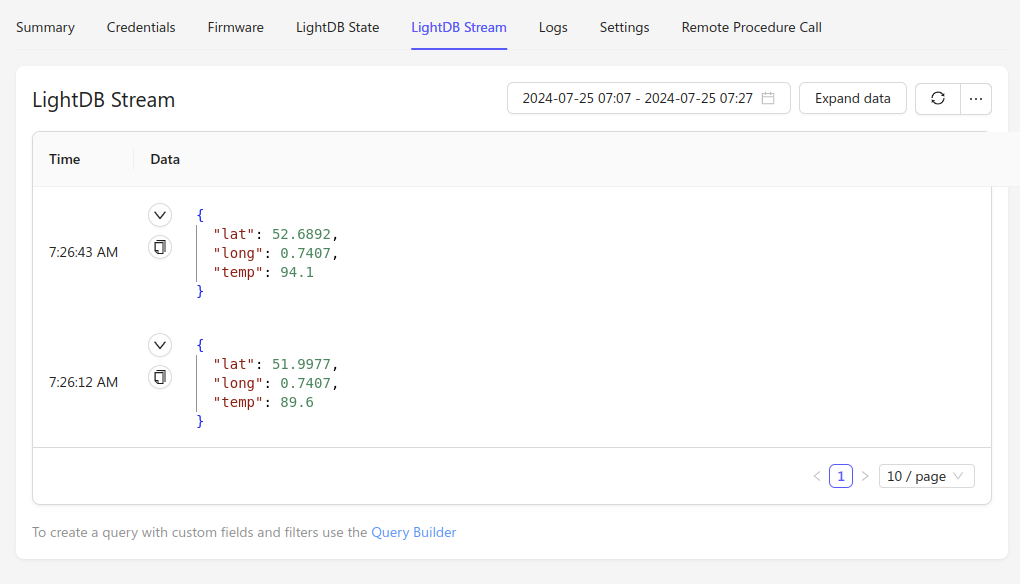
Finally, data is delivered to LightDB Stream, where it can be observed in the Golioth console. In the following example, CBOR payloads that included a temp field with values 34.5 and 32 respectively arrived at the pipeline. Each had their temp value converted from Celsius to Fahrenheit.
For more information on the webhook transformer, go to the documentation.
What’s Next
This post details one of the simplest cases of using the webhook transformer, but the possibilities it enables are endless. Keep an eye out for more examples on the blog next week, and let us know how you are using Golioth Pipelines on the forum!

No comments yet! Start the discussion at forum.golioth.io